Warm-Up: 3D Modeling with Tinkercad
In this activity, create a 3D model of something!
Getting Started: Tinkercad Account
In order to use Tinkercad, an account is required. Luckily, there are already credentials you can use!
Credentials:
- Username:
hytostudent@gmail.com - Password:
C0dingIsFun!
Instructions
Follow these steps to get started with a new 3D design:
- Go to tinkercad.com/login
- Click the blue "Personal accounts" button
- Click the black "Email or Username" button
- Enter
hytostudent@gmail.comas the Email, and click "Next" - Enter
C0dingIsFun!as the Password, and click "Sign in" - From there, click the "+ Create" button in the upper right
- Click the "3D Design" option
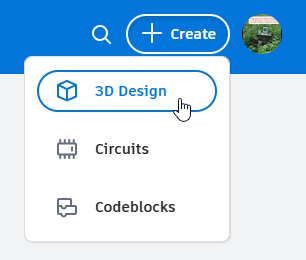
That's it! Now you have a new canvas upon which to build your three-dimensional hopes and dreams.
Building Something
Drag and drop the shapes on the right onto the canvas to add them. Put them together to create something interesting!
Notes
There is a lot you can do with Tinkercad - here are some capabilities:
- When you add shapes, you can change things like colors, positions, and sizes.
- You can select existing things by clicking the dropdown under "Basic Shapes" and selecting something new.
- You can move around the canvas by right clicking - hold Shift to pan, and use the scroll wheel to zoom.
Ideas
It may be good to start with some vision for what you want to make - here are some ideas:
- a house or other building
- a car or other vehicle
- an animal or other creature / character
Submitting
When you're done, submit your work using the form on the course homepage!
Follow these steps to get a shareable link:
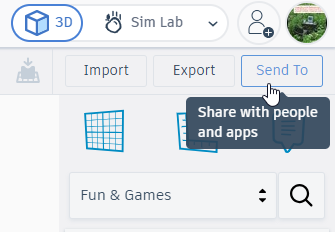
- Click the "Send To" button in the upper right
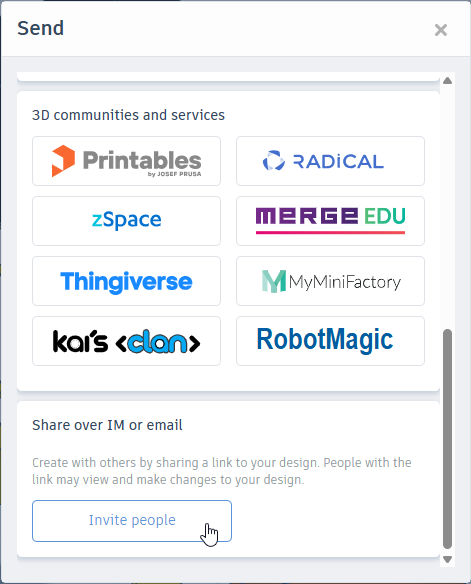
- In the pop-up that appears, scroll down and click the "Invite people" button
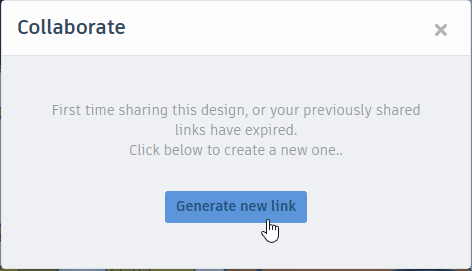
- In the subsequent pop-up, click the "Generate new link" button
- Finally, click the "Copy link" button!
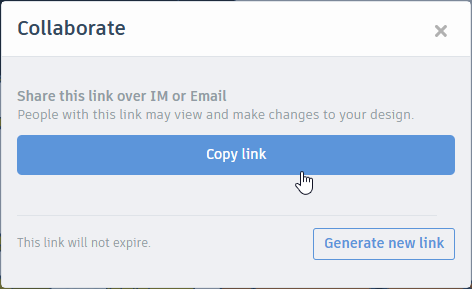
Now the link should be copied to your keyboard. Head over to the the form on the course homepage and submit that link!