Pizza Website: Follow-Along Activity
Alfredo's Pizza Cafe has some great pizza, but unfortunately their technological prowess is not so great. They need your help to create their website! They want to provide some information about their restaurants, along with an order form so customers can order pies online. Start from this empty project, and then follow the instructions below.
Setup
First, we need all the basics for a new HTML document file.
- Open up the index.html file
- Add the
htmltags (opening and closing) - Add the
bodytags within thehtmltags
Adding the Basics
Next, let's add some content for the very top of the website, with some basic information.
- Add an
h1header that says "Alfredo's Pizza Cafe" within thebody - Under the
h1, add animgof the pizza (set thesrcattribute to "https://styles.redditmedia.com/t5_21ulkr/styles/profileIcon_owuf7qzyhuk61.jpg") - Under the
img, add apthat says "WE'RE NOT FINE DINING; WE'RE JUST FINE FOOD!"- Note that this is the actual slogan of the actual Alfredo's Pizza Cafe
- Open your webpage in a browser and make sure it appears as expected!
At the end of this section, your code should look like this:
<html>
    <body>
        <h1>Alfredo's Pizza Cafe</h1>
        <img src="https://styles.redditmedia.com/t5_21ulkr/styles/profileIcon_owuf7qzyhuk61.jpg">
        <p>WE'RE NOT FINE DINING; WE'RE JUST FINE FOOD!</p>
    </body>
</html>
Adding a List of Locations
Now, add a list of locations served by the restaurant.
- Add an
h2header under thepthat says "Locations" - Under the
h2, add a newul(unordered list) - Within the
ul, add some locations withinlielements- Note that the
lielements are children of theulelement
- Note that the
- Open your webpage in a browser and make sure it appears as expected!
At the end of this section, your code should look like this:
<html>
    <body>
        <h1>Alfredo's Pizza Cafe</h1>
        <img src="https://styles.redditmedia.com/t5_21ulkr/styles/profileIcon_owuf7qzyhuk61.jpg">
        <p>WE'RE NOT FINE DINING; WE'RE JUST FINE FOOD!</p>
        <h2>Locations</h2>
        <ul>
            <li>Scranton, PA</li>
            <li>Albany, NY</li>
            <li>Utica, NY</li>
        </ul>
    </body>
</html>
Adding Hours
Now, add a table of operating hours for the restaurant.
- Add an
h2header under thepthat says "Locations" - Under the
h2, add atableelement - Within the
table, add atrfor the column headers- Note that the
trelement is a child thetableelement
- Note that the
- Within the top
trelement, add aththat says "Day" and aththat says "Open" - Next, under the
tr, add anothertr - Within that
tr, andtdelements for "Sunday" and "9AM-9PM" - Continue adding
trelements - one for each day of the week - Open your webpage in a browser and make sure it appears as expected!
The added table code should look something like this:
<h2>Hours</h2>
<table border>
    <tr>
        <th>Day</th>
        <th>Open</th>
    </tr>
    <tr>
        <td>Sunday</td>
        <td>11AM-9PM</td>
    </tr>
    <tr>
        <td>Monday</td>
        <td>Closed</td>
    </tr>
    <tr>
        <td>Tuesday</td>
        <td>4PM-9PM</td>
    </tr>
    <tr>
        <td>Wednesday</td>
        <td>4PM-9PM</td>
    </tr>
    <tr>
        <td>Thursday</td>
        <td>4PM-10PM</td>
    </tr>
    <tr>
        <td>Friday</td>
        <td>4PM-11PM</td>
    </tr>
    <tr>
        <td>Saturday</td>
        <td>4PM-11PM</td>
    </tr>
</table>
Adding a Video
Just for fun, we can add a video to this site to provide "more information" about the pizza.
IMPORTANT NOTE: you do NOT need to write any code by hand for the <iframe> element - YouTube gives you all the code you need.
- In the index.html file, add an
h2element that says "More Information" - Next, open a new tab and go to YouTube
- Search for a pizza-related video (e.g., gimme pizza)
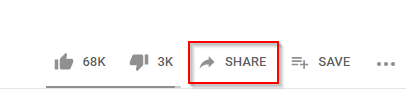
- Under the video, click the "SHARE" button
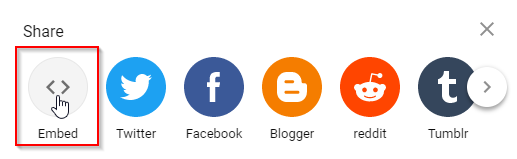
- Click "Embed"
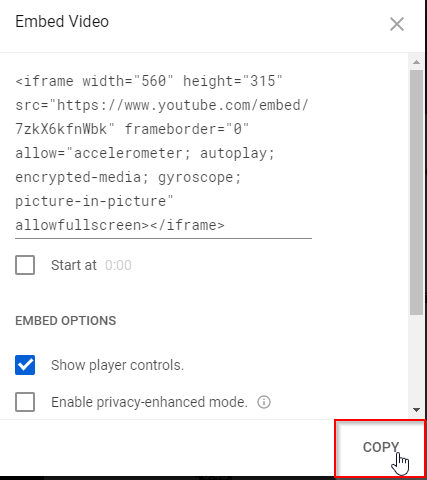
- Click "COPY"
- Back in HyTop, in the index.html file, paste the code at the bottom of the HTML section
- Use Ctrl+v
- Watch the video on your website!
The code should look something like this:
<iframe width="560" height="315" src="https://www.youtube.com/embed/SG_04GABaEM?si=tvhq04tKi4FuzD9o" title="YouTube video player" frameborder="0" allow="accelerometer; autoplay; clipboard-write; encrypted-media; gyroscope; picture-in-picture; web-share" referrerpolicy="strict-origin-when-cross-origin" allowfullscreen></iframe>
Adding the Order Form
The website has information now, but we still need to add in an order form! Start by adding an h2 header that says "Order Form" underneath the locations list. Then, follow the steps below to add some fields to the form.
Pizza Size
For pizza size, the user should be able to select from a dropdown of available sizes.
- Under the "Order Form"
h2, add anh3that says "Pizza Size"- This will serve as a label for our field
- Create a
selectelement under the "Pizza Size"h3 - Within the
select, add some pizza sizes withinoptionelements- Note that the
optionelements are children of theselectelement
- Note that the
- Open your webpage in a browser and make sure it appears as expected!
Your code for this section should look like this:
<h3>Pizza Size</h3>
<select>
    <option>Small</option>
    <option>Medium</option>
    <option>Large</option>
</select>
Toppings
For toppings, the user should be able to select whichever combination they choose using checkboxes.
- Under the Pizza Size
select, add anh3that says "Toppings" - Under the
h3, add a newpparagraph - Inside the
p, add aninputelement with thetypeattribute set to "checkbox" - Next to the
inputelement (still within thep), add the text "Pepperoni" - Repeat the above steps to add three additional topping
pelements, each with a checkbox and text - Open your webpage in a browser and make sure it appears as expected!
Your code for this section should look like this:
<h3>Toppings</h3>
<p><input type="checkbox"> Pepperoni</p>
<p><input type="checkbox"> Sausage</p>
<p><input type="checkbox"> Mushrooms</p>
<p><input type="checkbox"> Black Olives</p>
Name, Address, and Submit
Lastly, the user should be able to enter their name and address so Alfredo knows where to send the pizza! They will also need a submit button.
- Under the toppings, add an
h3that says "Name" - Under the Name
h3, add a newinputwith thetypeattribute set to "text" - Under the name
input, add anh3that says "Address" - Under the Address
h3, add a newtextareaelement - Under the address
textarea, add a newpelement - Within the
pelement, add a newinputelement with thetypeattribute set to "submit" - Open your webpage in a browser and make sure it appears as expected!
Your code for this section should look like this:
<h3>Name</h3>
<input type="text">

<h3>Address</h3>
<textarea></textarea>

<p><input type="submit"></p>
That's it! Your website has some information about the website, and a form the user can submit.
Final Code
<html>
    <body>
        <h1>Alfredo's Pizza Cafe</h1>
        <img src="https://styles.redditmedia.com/t5_21ulkr/styles/profileIcon_owuf7qzyhuk61.jpg">
        <p>WE'RE NOT FINE DINING; WE'RE JUST FINE FOOD!</p>

        <h2>Locations</h2>
        <ul>
            <li>Scranton, PA</li>
            <li>Albany, NY</li>
            <li>Utica, NY</li>
        </ul>

        <h2>Hours</h2>
        <table border>
            <tr>
                <th>Day</th>
                <th>Open</th>
            </tr>
            <tr>
                <td>Sunday</td>
                <td>11AM-9PM</td>
            </tr>
            <tr>
                <td>Monday</td>
                <td>Closed</td>
            </tr>
            <tr>
                <td>Tuesday</td>
                <td>4PM-9PM</td>
            </tr>
            <tr>
                <td>Wednesday</td>
                <td>4PM-9PM</td>
            </tr>
            <tr>
                <td>Thursday</td>
                <td>4PM-10PM</td>
            </tr>
            <tr>
                <td>Friday</td>
                <td>4PM-11PM</td>
            </tr>
            <tr>
                <td>Saturday</td>
                <td>4PM-11PM</td>
            </tr>
        </table>

        <h2>More Information</h2>
        <iframe width="560" height="315" src="https://www.youtube.com/embed/SG_04GABaEM?si=tvhq04tKi4FuzD9o" title="YouTube video player" frameborder="0" allow="accelerometer; autoplay; clipboard-write; encrypted-media; gyroscope; picture-in-picture; web-share" referrerpolicy="strict-origin-when-cross-origin" allowfullscreen></iframe>

        <h2>Order Form</h2>
        <h3>Pizza Size</h3>
        <select>
            <option>Small</option>
            <option>Medium</option>
            <option>Large</option>
        </select>

        <h3>Toppings</h3>
        <p><input type="checkbox"> Pepperoni</p>
        <p><input type="checkbox"> Sausage</p>
        <p><input type="checkbox"> Mushrooms</p>
        <p><input type="checkbox"> Black Olives</p>

        <h3>Name</h3>
        <input type="text">

        <h3>Address</h3>
        <textarea></textarea>
        <p><input type="submit"></p>
    </body>
</html>